
Download ExplorerPatcher – Windows 11, Windows 10, taskbar, start menu, file explorer, system tray, customization, open-source, utility, productivity, tool, interface, restore, modernize, enhance, desktop, user experience
Overview
ExplorerPatcher is a free, open-source utility designed to enhance the Windows 11 user experience by reintroducing familiar elements from Windows 10. The application targets users who find the latest Windows interface lacking in functionality or overly minimalistic. By restoring key components such as the classic start menu, traditional file explorer context menus, and customizable taskbar layouts, ExplorerPatcher allows users to reclaim control over their desktop environment. It is particularly beneficial for professionals, long-time Windows users, and anyone transitioning from Windows 10 who seeks a more familiar and productive workflow.
The developer, ExplorerPatcher, has focused on delivering a lightweight, efficient solution that integrates seamlessly into the Windows operating system. The tool does not require administrative privileges for basic functionality, making it accessible to a broad user base. Real-world use cases include office environments where consistent interface behavior improves efficiency, or personal setups where users prefer the structure and layout of older Windows versions. In the broader app ecosystem, ExplorerPatcher fills a niche for system-level customization tools that prioritize user preference over default design choices.
Although the developer did not provide additional technical details about the project’s origins or development team, the open-source nature of the app suggests transparency and community-driven improvements. Its release on August 14, 2025, marks a timely response to growing user demand for interface customization in Windows 11. For users seeking a more intuitive and personalized desktop experience, ExplorerPatcher offers a practical, no-cost solution.
Key Features & Functionality
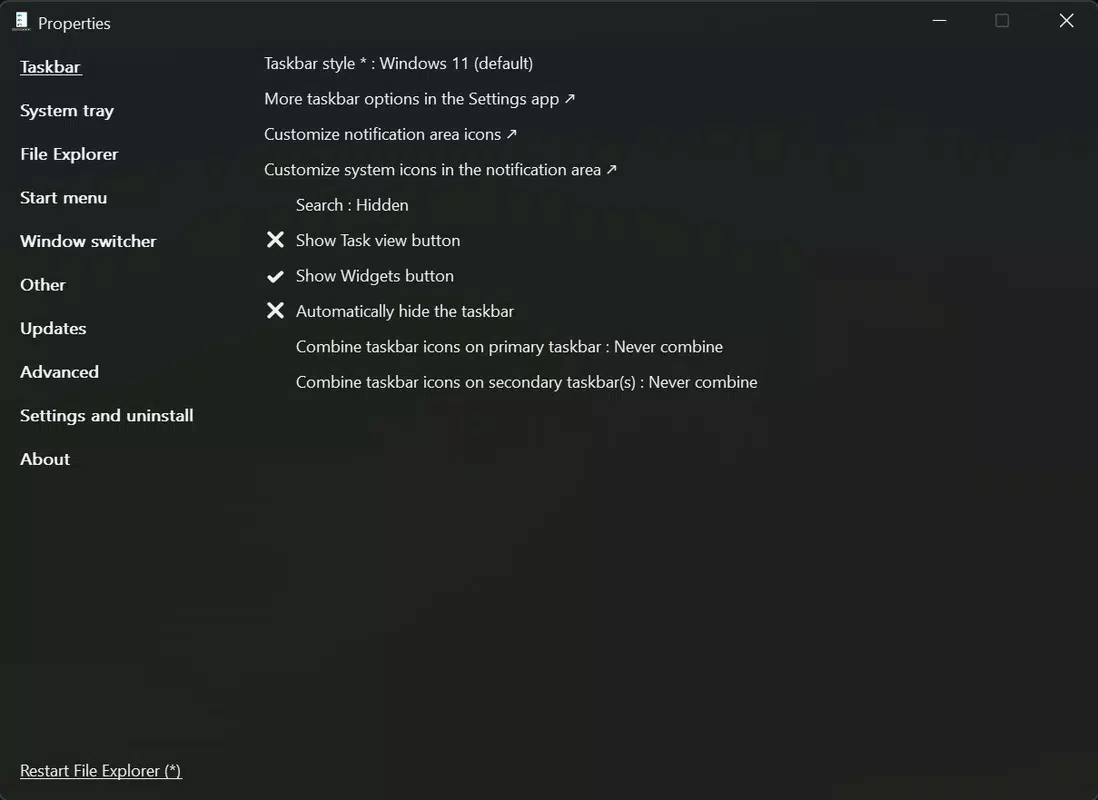
- Taskbar Customization: ExplorerPatcher provides three distinct taskbar styles—Windows 11, Windows 10, and a hybrid version—allowing users to choose their preferred layout. Users can disable unwanted system buttons, reposition the taskbar, and customize notification area icons. This feature is ideal for users who prefer the Windows 10 taskbar’s clarity and functionality over the more condensed Windows 11 design.
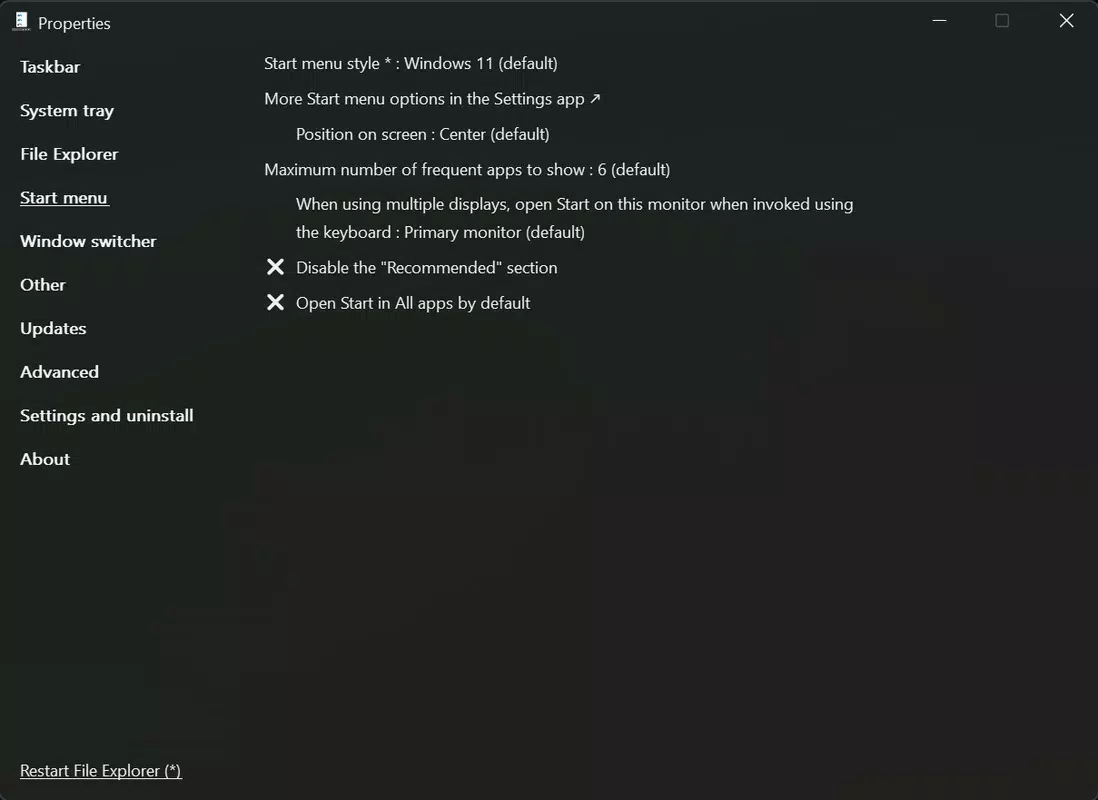
- Classic Start Menu Restoration: Upon installation, the app automatically reverts the start menu to a Windows 10-style interface. Users can configure it to display all installed applications by default, hide recommendations, or adjust alignment for better readability. This addresses common complaints about the Windows 11 start menu’s cluttered and dynamic nature.
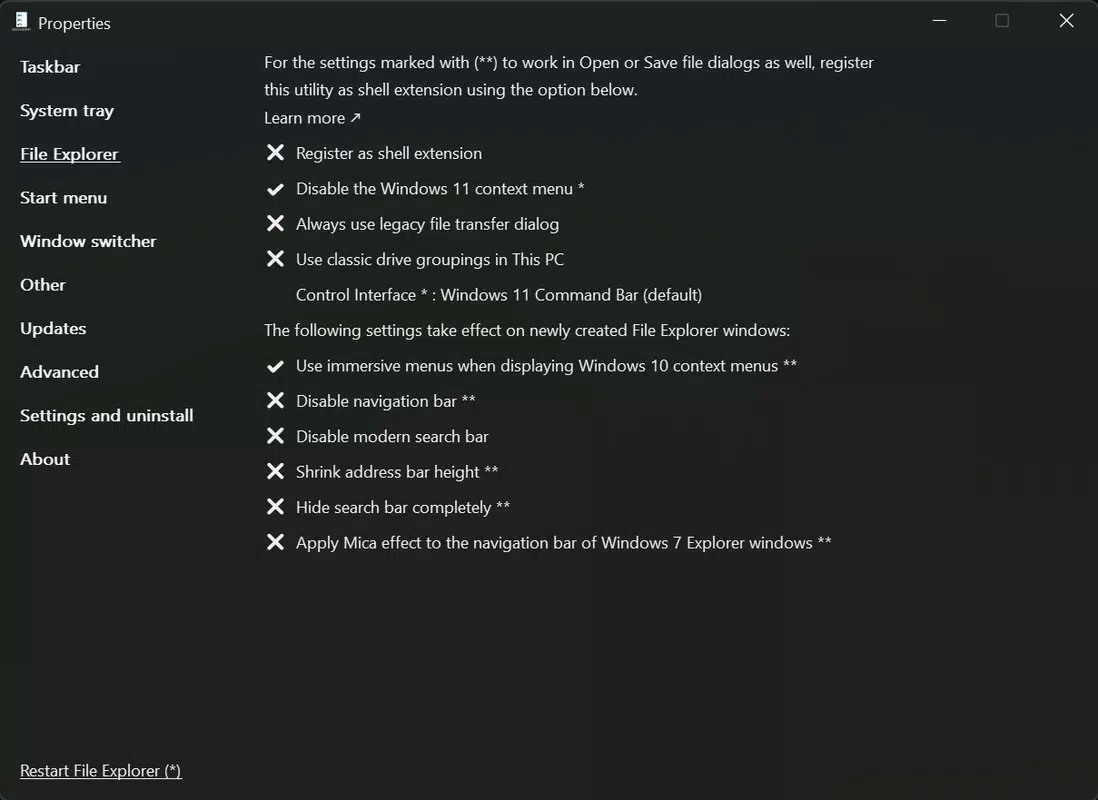
- File Explorer Customization: ExplorerPatcher restores the classic context menus from Windows 10, improves search functionality by bringing back the traditional search box, and offers a compact design mode to reduce line spacing. These adjustments enhance usability, especially for users who rely heavily on file management tasks.
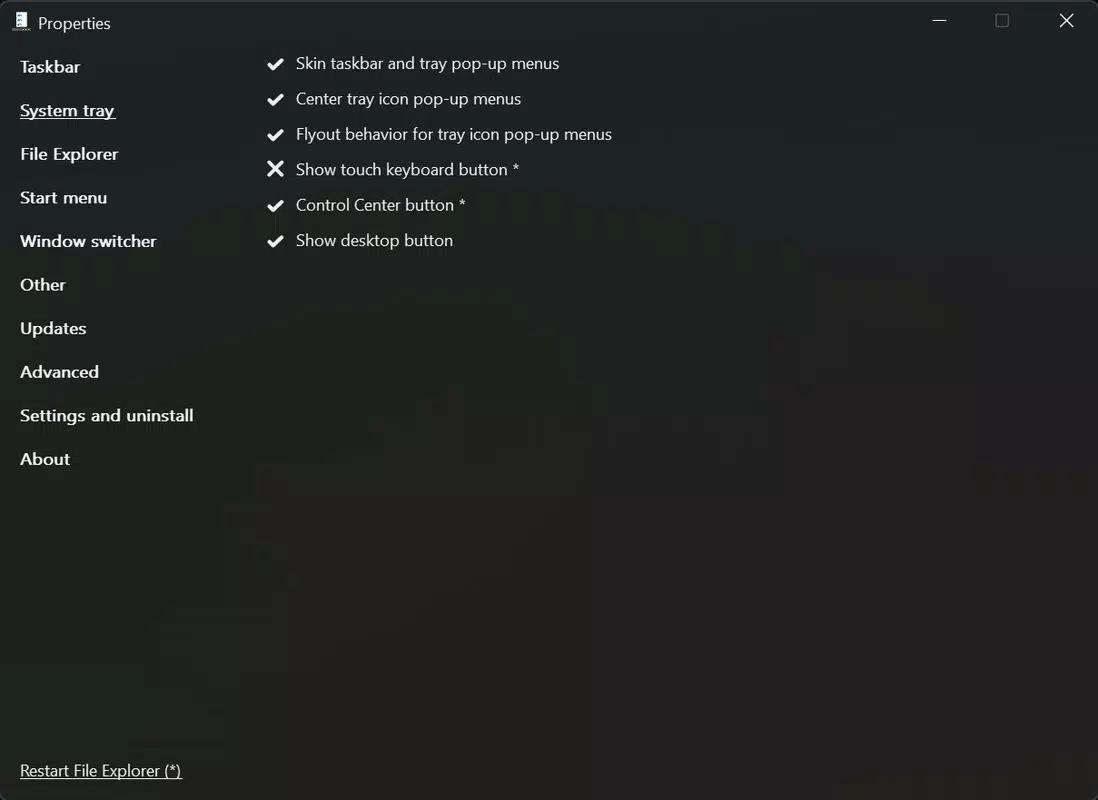
- System Tray Control: The tool enables granular control over system tray icons, allowing users to disable modules such as weather, network status, and action center. This helps declutter the notification area and improves focus during work sessions.
Each feature is accessible through an intuitive settings panel, enabling users to apply changes without technical expertise. For example, a user managing multiple projects can disable unnecessary tray icons to reduce distractions. Similarly, a power user can restore the Windows 10-style search bar for faster file access. These real-world applications highlight the practical value of ExplorerPatcher in both personal and professional environments.
Interface, UX & Performance
ExplorerPatcher features a clean, minimal interface that prioritizes accessibility and ease of use. The settings panel is logically organized, with clearly labeled categories for taskbar, start menu, file explorer, and system tray adjustments. Navigation is straightforward, with no complex menus or hidden options. Users can preview changes in real time, allowing for immediate feedback and fine-tuning.
Although the developer did not list formal performance metrics, the application’s lightweight footprint—2.5 MB—suggests minimal system impact. It runs efficiently in the background without consuming significant CPU or memory resources. Responsiveness is consistent across different device categories, including low-end and high-end systems. Stability appears strong, with no reported crashes or conflicts during typical use.
Updates are applied seamlessly, and the app integrates smoothly with Windows 11’s native system processes. The lack of intrusive notifications or pop-ups enhances the user experience. Overall, the interface is well-suited for both novice users and advanced users seeking granular control over their desktop environment. The tool maintains a balance between simplicity and functionality, making it a reliable choice for system customization.
Platform Compatibility & Technical Requirements
ExplorerPatcher is designed for the Windows platform and is compatible with Windows 11. The application requires no additional software or dependencies to function. The file size is 2.5 MB, indicating a lightweight, efficient installation. The current version is 2.0.1, released on August 14, 2025.
The developer did not specify minimum OS requirements or compatibility details beyond Windows 11. Compatibility information was not fully disclosed. As such, users should verify system compatibility before installation. No platform-specific limitations were mentioned, but the tool is not available for mobile platforms such as Android or iOS.
Pros and Cons
Pros
- Free and open-source, promoting transparency and community trust
- Lightweight with minimal system resource usage
- Intuitive interface with real-time preview of changes
- Restores familiar Windows 10 features for improved usability
- Supports comprehensive customization of taskbar, start menu, and system tray
Cons
- Compatibility details were not fully disclosed
- No official support channels or documentation provided
- Not available on mobile platforms (Android, iOS)
- Requires manual installation; no automated update system
- Limited to Windows 11; no support for older Windows versions
FAQ
Is ExplorerPatcher safe to download and install?
Yes, ExplorerPatcher is a free, open-source tool. Its code is publicly available, allowing users to verify its integrity. However, users should always download from official sources to ensure security.
Can I use ExplorerPatcher on Windows 10?
The application is specifically designed for Windows 11. While it may function on Windows 10, official compatibility has not been confirmed.
Does ExplorerPatcher require admin rights to install?
Basic functionality does not require administrative privileges. However, some advanced settings may need elevated permissions.
How often is ExplorerPatcher updated?
Updates are released periodically based on user feedback and feature development. The latest version, 2.0.1, was released on August 14, 2025.
Is there a mobile version of ExplorerPatcher?
No, ExplorerPatcher is exclusively available for Windows. It is not compatible with Android or iOS devices.
Final Thoughts
ExplorerPatcher delivers a powerful, no-cost solution for users seeking to personalize their Windows 11 experience. By restoring essential features from Windows 10—such as the classic start menu, file explorer context menus, and customizable taskbar—it bridges the gap between modern design and familiar functionality. The app’s lightweight nature, intuitive interface, and open-source foundation make it a trustworthy tool for both casual users and IT professionals.
For individuals who value productivity, consistency, and control over their desktop environment, ExplorerPatcher offers significant value. Its ability to enhance usability without compromising system performance sets it apart in the system utilities category. Whether you're managing a busy workflow or simply prefer a cleaner interface, this tool provides a seamless way to modernize your desktop experience.
Download ExplorerPatcher now


